Vinted AI Tutorial: How to Take Great Photos?
Your clothes are in good condition, priced right, and yet nobody clicks. I lived that with 23 items gathering dust for weeks. Until the day I redid everything with AI. 6 sales the next day, 14 more within 48h. The only difference: the photos.
Why the Photo is Everything on Vinted
On Vinted, buyers scroll fast. They don't read your description first — they look at your thumbnail. If it doesn't make them want to click, it's over. A flat lay doesn't show how the item looks on a body, and that's exactly what buyers want to know.
The good news? You no longer need to pose, find someone, or organise a photo shoot. AI can now generate a realistic photo of your item being worn, from a simple flat lay. In 2 minutes, you go from an invisible listing to one that pulls in clicks.
ChatGPT or VintyLook: What's the Difference?
When people talk about AI for Vinted, many think of ChatGPT. But ChatGPT can't create a worn photo of your item. It's a text tool, not an image tool.
VintyLook is built specifically for Vinted. You upload your photo, and in under 2 minutes you get a realistic worn photo on an AI model. True-to-life colours, visible cut, professional finish. And on top of that, VintyLook also automatically generates the title and description for your listing from your photo. You don't need to write a single word.
In short:
- ChatGPT: useful for text, but you have to explain everything yourself
- VintyLook: worn photo + title + description, all in one, in 2 minutes flat
That's the real difference. With VintyLook, you have nothing to write, nothing to invent: the AI sees your item and handles everything.
How to Create Your Photos with VintyLook, Step by Step
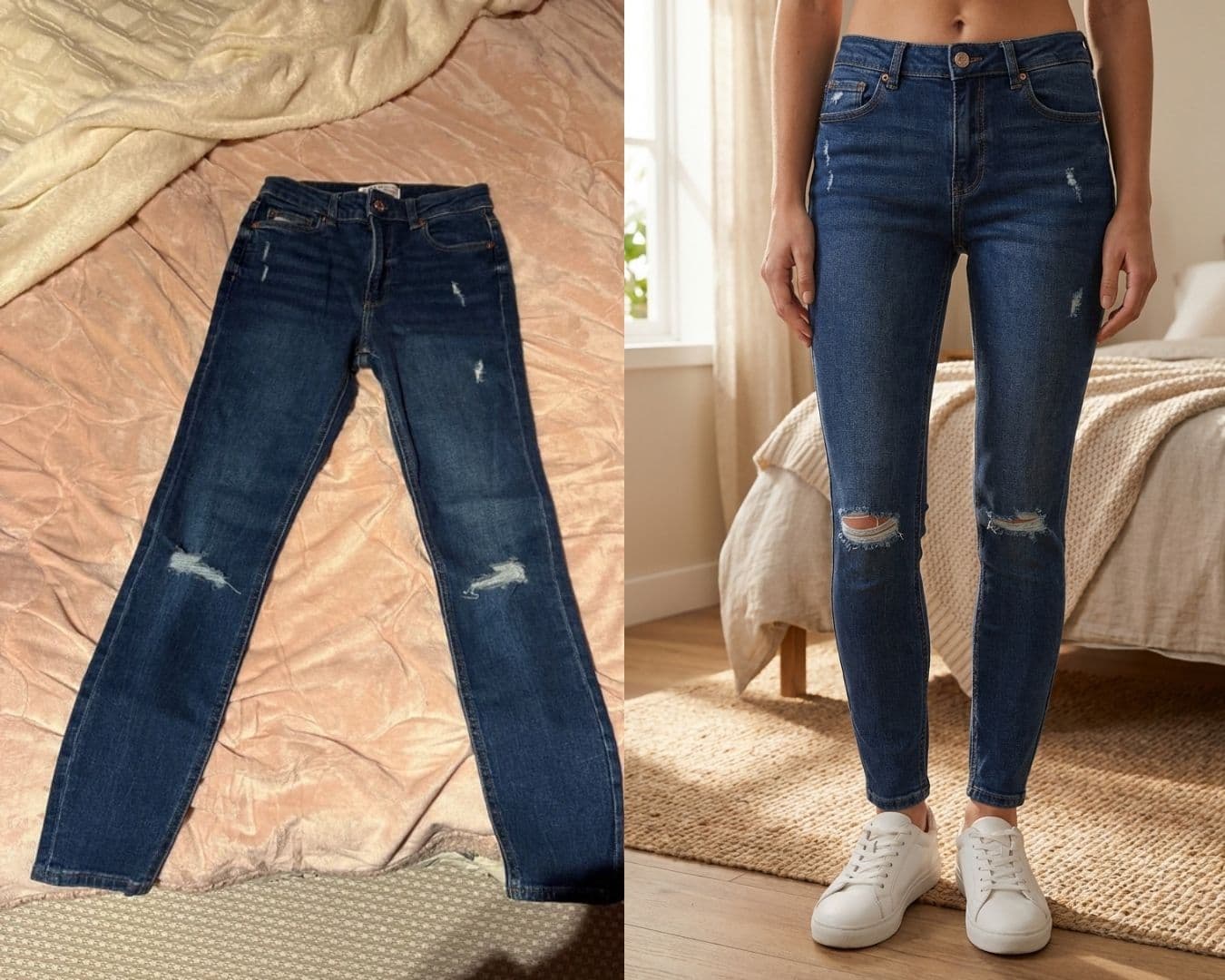
1. Take a photo of your item flat on a neutral background (white, grey, clean floor), with good natural light. It doesn't need to be perfect.
2. Go to VintyLook and upload your photo, or paste your Vinted listing link directly if you already have one.
3. The AI automatically generates a realistic worn photo in 60 to 90 seconds. Download it and add it straight to your listing.
That's it. Really. If you know how to send a photo by message, you know how to use VintyLook.
Price? 3.49€ for 10 credits, 6.99€ for 25. If you sell regularly, the 11.99€/month subscription for 50 credits is the best value. One extra sale easily covers the investment.
What About the Title and Description?
Good news: VintyLook handles that automatically too. After generating your worn photo, the tool suggests a title and description ready to paste into your listing. More precise and complete than what most people write by hand. "Oversized beige women's wool jumper M Zara" rather than "beige jumper": the more specific you are, the more you show up in searches.
For the description, just answer the questions a buyer would have: actual size, any flaws, where it's from? Two or three sentences are enough. What sells is the photo first.
Get Started Tonight
Pick 5 items that haven't moved in over two weeks. Redo their photos with VintyLook. Update your listings! 🚀
FAQ
Is VintyLook hard to use?
Not at all. You upload a photo, wait 90 seconds, download the result. If you know how to use Vinted, you know how to use VintyLook.
What's the difference with ChatGPT?
ChatGPT can't create worn photos — it's a text tool. VintyLook generates the worn photo AND the title AND the description, all automatically from your photo. You don't have to write anything yourself.
How much does it cost for 10 items?
3.49€ for 10 credits, meaning 10 worn photos. One extra sale easily covers that investment.
Does it work for all types of clothing?
Yes: dresses, jumpers, jackets, coats, jeans, t-shirts... VintyLook works with all types of clothing. The only condition is having a clear photo of the item.